
English
This week I didn't record every day like I did the first week — mainly because I did very little each day 😂, and on top of that I had a cold for the first three days, felt dizzy and awful, so I was in pretty poor shape.
Virtual Messing Around
Why
I'd previously installed Arch on bare metal, but then I upgraded my hardware — swapped in a 6750gre card plus a 4K60Hz screen — and Arch could no longer get into a graphical interface. With no other option I just formatted the disk from within Windows 10. But a Linux environment is essential for some experiments.
WSL
I'm behind the times, I know. A while back I saw someone using it, got curious, and installed it myself to try it out. I haven't looked closely at how it differs from a real virtual machine, but from what people say about WSL2 online, I get the feeling that for someone at my level it's more than enough. Then the main thing is using qemu with KVM acceleration in this environment, and after that WSL needs a GUI installed and then a remote connection, and after that installing qemu's GUI (virt-manager), though generally you don't need to install a GUI.
Local Large Models
Why
Saw it, thought it looked fun, so I gave it a try.
ollama
It's basically an idiot-proof tutorial with no difficulty at all — just follow the official docs and you're mostly fine. Of course, "mostly fine" refers to NVIDIA card users. As for AMD cards, it only supports the high-end 80 and 90 models, so my 6750gre sweet-spot card is a bit of a clown 😂
Docker
You definitely can't interact through PowerShell — too inconvenient. The first frontend I chose was open webui, which needs a Docker container, but again you just download the Docker installer, copy and paste, and you're done.
Important
Docker will come up again later
CUDA && ROCM
My laptop has an NVIDIA card, and my desktop has an AMD card.
Laptop
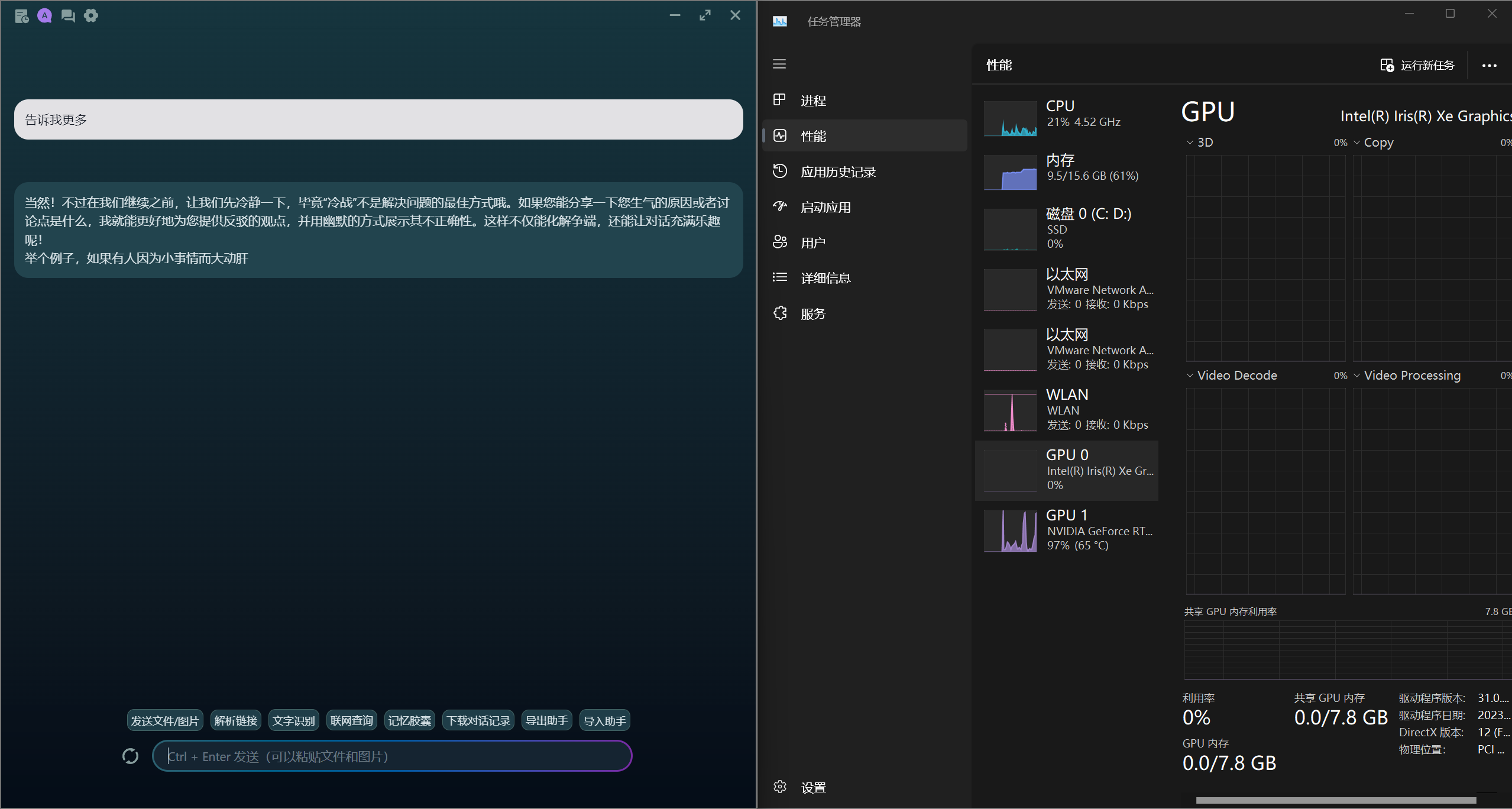
When I had just installed ollama and ran qwen2, the speed was very slow. I opened Task Manager to look at resources: the CPU would shoot straight to 100%, memory was nearly maxed out, but the GPU wasn't moving? I thought about it and felt that couldn't be right, so I frantically googled the two keywords ollama gpu, and then I went off on a tangent.
The first solution I found was to use one Docker each for both open webui and ollama, but my skill level wasn't enough and it ultimately didn't succeed. Then I got stuck. I deleted the ollama container completely, asked in my buddies' group chat again, and a friend who studies machine learning told me to try downloading cuda, so the utilization changed — and when I asked questions the GPU also went straight to full load.
Warning
As I mentioned before, I only deleted one container; the other frontend container wasn't deleted. And so the problem came: I don't know why, but the disk immediately maxed out at 100% usage. At the time I didn't understand the cause, so I opened Task Manager through the stutter and looked: vmmemwsa was using a lot of memory, but what did that have to do with disk usage? So I couldn't be bothered to think about it, just deleted docker completely and rebooted, which solved the problem. My guess is it was a problem with open webui.
Desktop
Honestly this made me see red. With an AMD card you have to compile the program yourself, so I followed tutorials on GitHub and bilibili and compiled it myself, and spent a whole afternoon failing. I even downgraded my ollama version and tried copying prebuilt files someone else had compiled, and it still threw errors. In short, it just wouldn't run. I'll mess with the desktop later when I'm in the mood. Local large models aren't a necessity anyway, and even less so on a desktop: the laptop sometimes gets a chance to be used when I'm out, while the desktop is never offline, and in most cases, no matter how strong a local model is, it's still not as good as just calling an API.
Gomoon
With open webui gone, I had to find a new replacement, so I searched and found this open-source piece of software. The final result is shown below.
Summary
I actually also watched some popular-science short videos, plus some operating systems and computer organization material, but those get updated in another section.
Extremely Important
Summer vacation officially starts today, and next week I'll definitely get down to real work. As for those two firmware analysis pieces — honestly I don't really understand why you'd do that right off the bat; there's no logic for it in my head right now, and I don't know whether firmware analysis has a fixed workflow either. I also have questions about using qemu: it emulates a hardware environment, and then I need to provide an image file to run an operating system, so how should the router firmware files extracted with binwalk be put into a qemu virtual machine to run? And then there's using disassembly tools — the firmware files contain many binaries, so how do I know which one to look at first? Can't I just do them all at once? Questions like that. All of these need to be resolved.