
English
day-05
Today's Agenda
- Getting Started with Redis
- Common Redis Data Types
- Common Redis Commands
- Operating Redis in Java
- Setting the Store's Business Status
Getting Started with Redis
Introduction to Redis
Redis is an in-memory key-value database.
- In-memory storage with high read/write performance
- Suited to storing hot data (popular products, information, news)
- Widely used in enterprise applications
Hmm, there isn't much to this part really, so I'll just connect straight to Redis on my own server.
Common Redis Data Types
Redis stores data in a key-value structure, where the key is of the string type and the value has 5 common data types:
- String: an ordinary string, the simplest data type in Redis
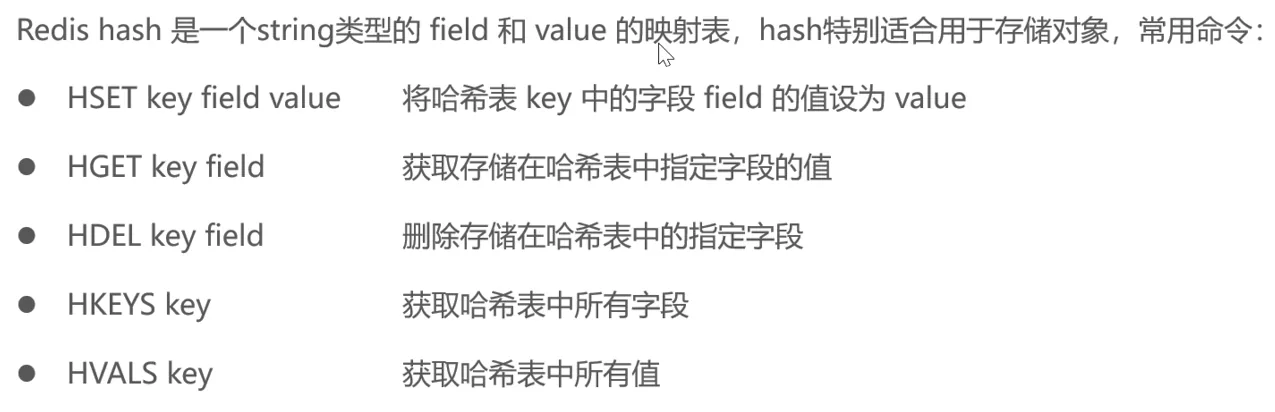
- Hash: also called a hash, similar to the HashMap structure in Java
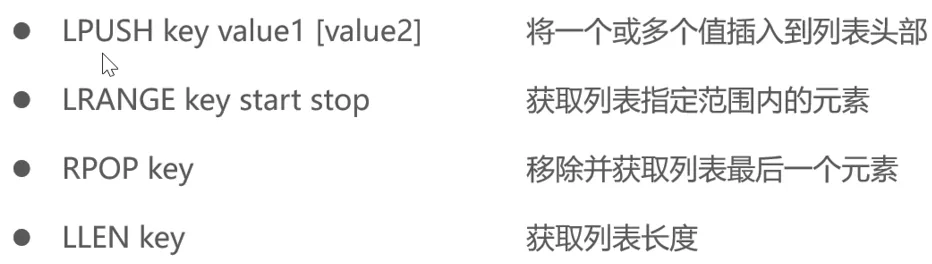
- List: sorted in insertion order, may contain duplicate elements, similar to LinkedList in Java
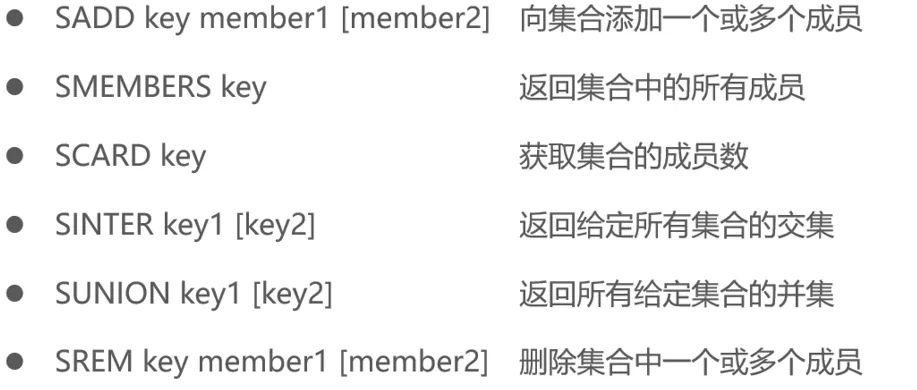
- Set: an unordered collection with no duplicate elements, similar to HashSet in Java
- Sorted set / zset: each element in the collection is associated with a score, sorted in ascending order by score, with no duplicate elements
Common Redis Commands
String Operation Commands
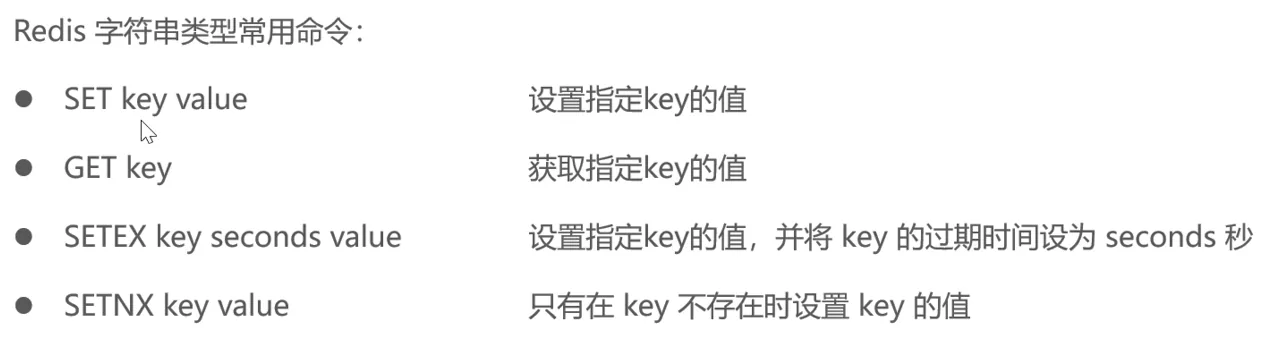
Hash Operation Commands
List Operation Commands
Set Operation Commands
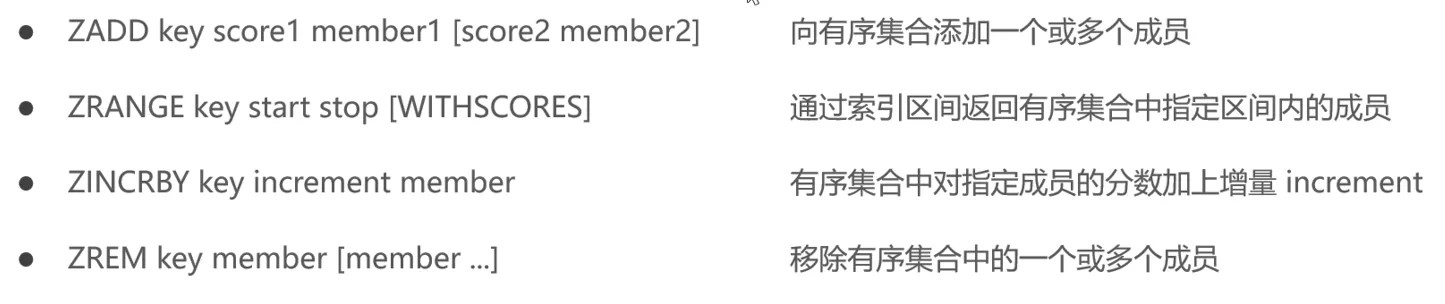
Sorted Set Operation Commands
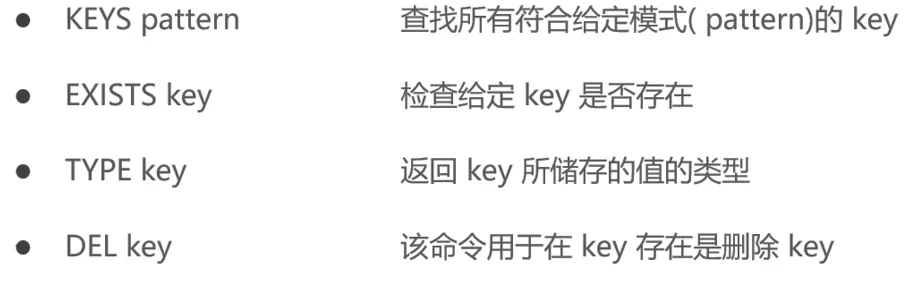
General Commands
Operating Redis in Java
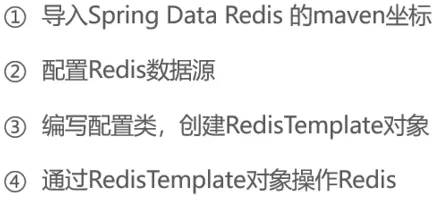
Importing the Maven Coordinates
xml
<dependency>
    <groupId>org.springframework.boot</groupId>
    <artifactId>spring-boot-starter-data-redis</artifactId>
</dependency>Configuring the Redis Data Source
application.yml
yaml
spring:
	redis:
  host: ${sky.redis.host}
  prot: ${sky.redis.port}
  password: ${sky.redis.password}
database: ${sky.redis.database}application-dev.yml
yaml
sky:
	redis:
  host: 154.37.215.94
  port: 6379
  password: redis_GEGpKR
database: 0Writing a Configuration Class and Creating a RedisTemplate Object
Some boring test-class rambling — not worth listening to, so let's skip it.
java
package com.sky.test;

import org.junit.jupiter.api.Test;
import org.springframework.beans.factory.annotation.Autowired;
import org.springframework.boot.test.context.SpringBootTest;
import org.springframework.data.redis.core.*;

import java.util.List;
import java.util.Set;
import java.util.concurrent.TimeUnit;

@SpringBootTest
public class SpringDataRedisTest {
    @Autowired
    private RedisTemplate redisTemplate;

    @Test
    public void testRedisTemplate() {
        System.out.println(redisTemplate);
        ValueOperations valueOperations = redisTemplate.opsForValue();
        HashOperations hashOperations = redisTemplate.opsForHash();
        ListOperations listOperations = redisTemplate.opsForList();
        SetOperations setOperations = redisTemplate.opsForSet();
        ClusterOperations clusterOperations = redisTemplate.opsForCluster();
    }

    @Test
    public void testString() {
        redisTemplate.opsForValue().set("city", "北京");
        Object city = redisTemplate.opsForValue().get("city");
        System.out.println(city);
        redisTemplate.opsForValue().set("code","1234", 3, TimeUnit.MINUTES);
        redisTemplate.opsForValue().setIfAbsent("lock","1");
        redisTemplate.opsForValue().setIfAbsent("lock","2");
    }

    @Test
    public void testHash(){
        HashOperations hashOperations = redisTemplate.opsForHash();
        hashOperations.put("100","name","tom");
        hashOperations.put("100","age","20");

        Object name = hashOperations.get("100", "name");
        System.out.println(name);

        Set keys = hashOperations.keys("100");
        System.out.println(keys);

        List values = hashOperations.values("100");
        System.out.println(values);

        hashOperations.delete("100","age");
    }

    @Test
    public void testList(){
        ListOperations listOperations = redisTemplate.opsForList();
        listOperations.leftPushAll("mylist","a","b","c");
        listOperations.leftPush("mylist","d");

        List mylist = listOperations.range("mylist", 0, -1);
        System.out.println(mylist);

        listOperations.rightPop("mylist");

        Long size = listOperations.size("mylist");
        System.out.println(size);
    }
}Setting the Store's Business Status
Requirements Analysis and Design
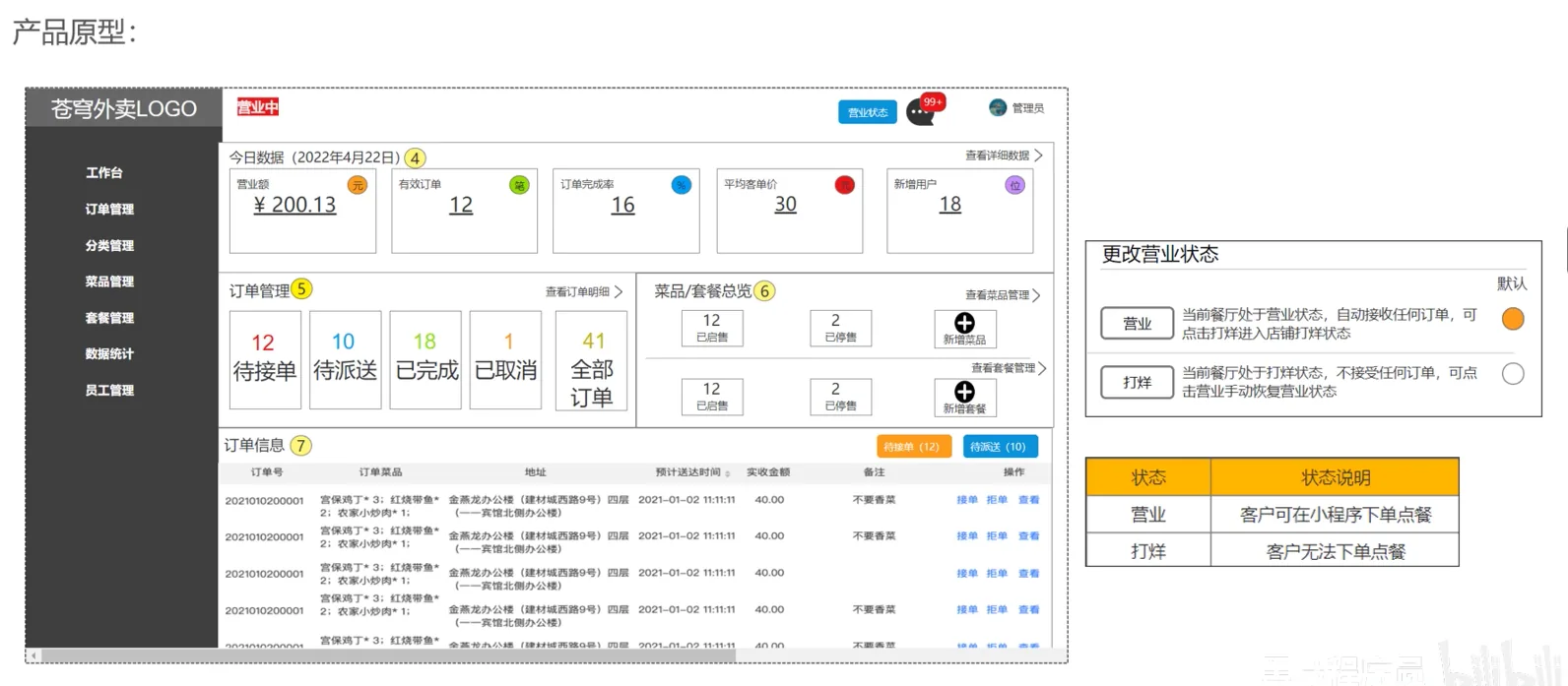
Code Development
Config
RedisConfigration
I didn't quite understand what @Configuration does together with @Bean before.
I think I get it here: @Configuration declares that this is a configuration class, and then @Bean applies dependency injection to the object returned by the annotated function.
It is usually used for third-party components or for beans that need complex configuration.
java
package com.sky.config;

import lombok.extern.slf4j.Slf4j;
import org.springframework.context.annotation.Bean;
import org.springframework.context.annotation.Configuration;
import org.springframework.data.redis.connection.RedisConnectionFactory;
import org.springframework.data.redis.core.RedisTemplate;
import org.springframework.data.redis.serializer.StringRedisSerializer;

@Configuration
@Slf4j
public class RedisConfiguration {
    @Bean
    public RedisTemplate redisTemplate(RedisConnectionFactory redisConnectionFactory) {
        RedisTemplate redisTemplate = new RedisTemplate();
        //设置redis的链接工厂对象
        redisTemplate.setConnectionFactory(redisConnectionFactory);
        //设置redis key的序列化器
        redisTemplate.setKeySerializer(new StringRedisSerializer());

        return redisTemplate;
    }
}Controller
This is fairly easy to understand too: inject the dependency into this Controller, and then just call the injected Redis template to operate on the Redis database according to the request.
ShopController
java
package com.sky.controller.admin;

import com.sky.result.Result;
import lombok.extern.slf4j.Slf4j;
import org.springframework.beans.factory.annotation.Autowired;
import org.springframework.data.redis.core.RedisTemplate;
import org.springframework.web.bind.annotation.*;

@RestController("adminShopController")
@RequestMapping("/admin/shop")
@Slf4j
public class ShopController {
    public static final String KEY = "SHOP_STATUS";

    @Autowired
    private RedisTemplate redisTemplate;

    @PutMapping("/{status}")
    public Result setStatus(@PathVariable Integer status) {
        log.info("设置店铺的营业状态:{}", status);
        redisTemplate.opsForValue().set(KEY, status);
        return Result.success();
    }

    @GetMapping("/status")
    public Result<Integer> getStatus(){
        Integer shopStatus = (Integer) redisTemplate.opsForValue().get(KEY);
        log.info("获取到店铺的营业状态为:{}",shopStatus);
        return Result.success(shopStatus);
    }
}ShopController
java
package com.sky.controller.user;

import com.sky.result.Result;
import lombok.extern.slf4j.Slf4j;
import org.springframework.beans.factory.annotation.Autowired;
import org.springframework.data.redis.core.RedisTemplate;
import org.springframework.web.bind.annotation.GetMapping;
import org.springframework.web.bind.annotation.RequestMapping;
import org.springframework.web.bind.annotation.RestController;

@RestController("userShopController")
@RequestMapping("/user/shop")
@Slf4j
public class ShopController {
    public static final String KEY = "SHOP_STATUS";

    @Autowired
    private RedisTemplate redisTemplate;

    @GetMapping("/status")
    public Result<Integer> getShop(){
        Integer shopStatus = (Integer) redisTemplate.opsForValue().get(KEY);
        log.info("shopStatus:{}", shopStatus);
        return Result.success(shopStatus);
    }
}