
English
day-03
Today's Agenda
- 01-Automatic Filling of Common Fields
- 02-Adding a Dish
- 03-Paginated Query for Dishes
- 04-Deleting Dishes
- 05-Updating a Dish
01-Automatic Filling of Common Fields
Extremely important content
Problem Analysis
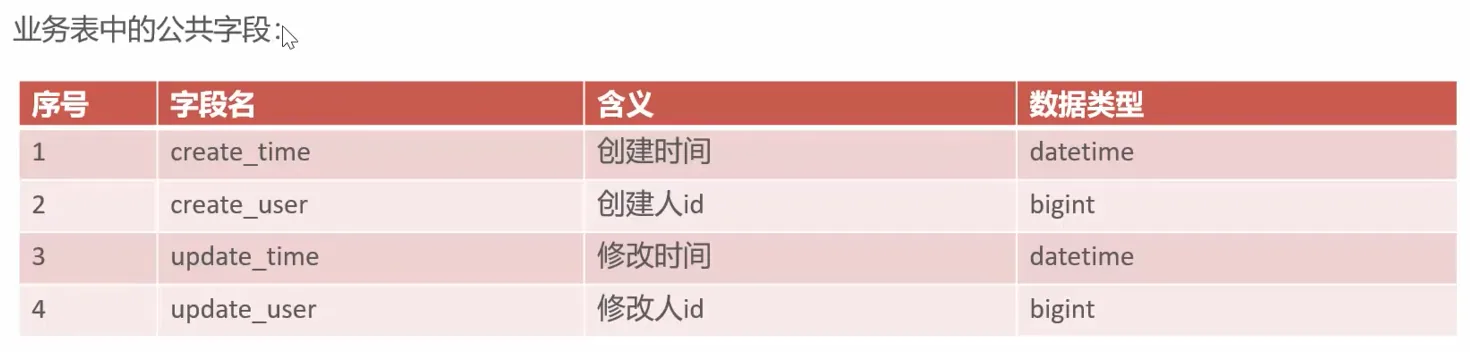

The code is redundant and hard to maintain later on
Implementation Approach

- A custom annotation, AutoFill, marks the methods that need automatic filling of common fields
- A custom aspect class, AutoFillAspect, intercepts every method annotated with AutoFill in a unified way and assigns values to the common fields through reflection
- Add the AutoFill annotation to the Mapper methods
The technical points are as follows:
- Enums
- Annotations
- AOP
- Reflection
Code Implementation
Let me first go over the four files that will be used here
- AutoFill
- AutoFillAspect
- BaseContext
- OperationType
BaseContext
This context class was already mentioned once in 01-Adding an Employee in day-02. Its main purpose is to obtain context information within a thread through static methods, and the automatic filling of common fields we are implementing here is exactly the same thing
java
package com.sky.context;

public class BaseContext {

    public static ThreadLocal<Long> threadLocal = new ThreadLocal<>();

    public static void setCurrentId(Long id) {
        threadLocal.set(id);
    }

    public static Long getCurrentId() {
        return threadLocal.get();
    }

    public static void removeCurrentId() {
        threadLocal.remove();
    }

}OperationType
It is used together with the annotation (@AutoFill) in the AOP aspect. By marking the OperationType that corresponds to a method, different logic can be executed automatically
java
package com.sky.enumeration;

/**
 * 数据库操作类型
 */
public enum OperationType {

    /**
     * 更新操作
     */
    UPDATE,

    /**
     * 插入操作
     */
    INSERT

}AutoFill
- A custom annotation, AutoFill, marks the methods that need automatic filling of common fields
Here we define a custom annotation by creating an annotation package directly under the server package and creating an annotation class named AutoFill in that annotation package
java
package com.sky.annotation;

import com.sky.enumeration.OperationType;

import java.lang.annotation.ElementType;
import java.lang.annotation.Retention;
import java.lang.annotation.RetentionPolicy;
import java.lang.annotation.Target;

@Target(ElementType.METHOD)
@Retention(RetentionPolicy.RUNTIME)
public @interface AutoFill {
    OperationType value();
}@Target(ElementType.METHOD): specifies that the annotation can only be used on methods (it cannot be used on classes, fields, or other elements).@Retention(RetentionPolicy.RUNTIME): specifies that the annotation is still valid at runtime, so its information can be retrieved through reflectionOperationType value();: defines an attribute namedvalueof typeOperationType(an enum class)- When using it, you have to assign a value to that attribute, for example
@AutoFill(OperationType.INSERT)or@AutoFill(OperationType.UPDATE)
Note that the value attribute could also be given some other custom name, but using value lets you skip passing the value when applying the annotation
AutoFillAspect
A very important point here is how to understand the relationship between AutoFill and AutoFillAspect. I think it can be compared to the relationship between declaring a generic interface and the code that implements that generic interface
- AutoFill declares an annotation
- AutoFillAspect is where the concrete usage logic of that annotation is written
Next, let's look at the concrete code implementation
java
package com.sky.aspect;

import com.sky.annotation.AutoFill;
import com.sky.constant.AutoFillConstant;
import com.sky.context.BaseContext;
import com.sky.enumeration.OperationType;
import lombok.extern.slf4j.Slf4j;
import org.aspectj.lang.JoinPoint;

import org.aspectj.lang.annotation.Aspect;
import org.aspectj.lang.annotation.Before;
import org.aspectj.lang.annotation.Pointcut;
import org.aspectj.lang.reflect.MethodSignature;
import org.springframework.stereotype.Component;

import java.lang.reflect.Method;
import java.time.LocalDateTime;

//自定义切面
@Aspect
@Component
@Slf4j
public class AutoFillAspect {

    @Pointcut("execution(* com.sky.mapper.*.*(..)) && @annotation(com.sky.annotation.AutoFill)")
    public void autoFillPointCut() {
    }

    //前置通知,在通知中进行公共字段的赋值
    @Before("autoFillPointCut()")
    public void autoFill(JoinPoint joinPoint) {
        log.info("开始进行公共字段的填充...");
        //获取到当前被拦截的方法上的数据库操作类型
        MethodSignature signature = (MethodSignature) joinPoint.getSignature();//方法签名对象
        AutoFill autoFill = signature.getMethod().getAnnotation(AutoFill.class);//获得方法上的注解对象
        OperationType operationType = autoFill.value();//获得数据库操作类型
        //获取到当前被拦截的方法的参数--实体对象
        Object[] args = joinPoint.getArgs();
        if (args == null || args.length == 0) {
            return;
        }
        Object entity = args[0];

        //准备赋值的数据
        LocalDateTime now = LocalDateTime.now();
        Long currentId = BaseContext.getCurrentId();
        //根据当前不同的操作类型,为对应的属性通过反射来赋值
        if (operationType == OperationType.INSERT) {
            //为四个公共字段赋值
            try {
                Method setCreateTime = entity.getClass().getDeclaredMethod(AutoFillConstant.SET_CREATE_TIME, LocalDateTime.class);
                Method setCreateUser = entity.getClass().getDeclaredMethod(AutoFillConstant.SET_CREATE_USER, Long.class);
                Method setUpdateTime = entity.getClass().getDeclaredMethod(AutoFillConstant.SET_UPDATE_TIME, LocalDateTime.class);
                Method setUpdateUser = entity.getClass().getDeclaredMethod(AutoFillConstant.SET_UPDATE_USER, Long.class);
                //通过反射对对象属性进行赋值
                setCreateTime.invoke(entity, now);
                setCreateUser.invoke(entity, currentId);
                setUpdateTime.invoke(entity, now);
                setUpdateUser.invoke(entity, currentId);
            } catch (Exception e) {
                e.printStackTrace();
            }
        } else if (operationType == OperationType.UPDATE) {
            //为两个公共字段赋值
            try {
                Method setUpdateTime = entity.getClass().getDeclaredMethod(AutoFillConstant.SET_UPDATE_TIME, LocalDateTime.class);
                Method setUpdateUser = entity.getClass().getDeclaredMethod(AutoFillConstant.SET_UPDATE_USER, Long.class);
                //通过反射对对象属性进行赋值
                setUpdateTime.invoke(entity, now);
                setUpdateUser.invoke(entity, currentId);
            } catch (Exception e) {
                e.printStackTrace();
            }
        }
    }
}- First, note the decorators @Aspect and @Component. The former only declares that this is an aspect class and does not register it in Spring's IoC container, so you must declare the latter for it to be registered
- Next, let me explain my current understanding of the AOP programming idea: the whole project is a three-dimensional cuboid, and AOP programming means cutting out a plane in the middle, then finding a join point within that plane, and then operating on that join point
So in the code above, we first use @Pointcut to declare a pointcut method at a specific location, and then use the @Before advice, passing in the pointcut above to indicate which pointcuts the before advice should operate on
The autoFill method decorated with @Before takes a JoinPoint interface, which encapsulates the key information of the intercepted method, allowing us to obtain and operate on data related to the intercepted method inside the aspect
Simply put, when the aspect intercepts the target method (a method marked with @AutoFill), JoinPoint acts like a "data carrier" that helps us get all sorts of information about that method, such as the method name, its parameters, and the class it belongs to The following steps deconstruct JoinPoint layer by layer
- Obtain the method signature object
- Obtain the annotation object inside that object
- Obtain the value attribute from the annotation object
At this point we can get the enum constant of the OperationType enum class, and therefore the database operation type After that, we pull the parameter object passed into the target method out of the JoinPoint object and receive it with an Object array
To be on the safe side, check whether the received object is null
Then we receive the first object parameter in the object array and prepare the data to be assigned; note that the context static method is used to assign the id
Next comes performing different assignment operations on the obtained object according to the different operation types
This is where reflection-based assignment comes in; its essence is implementing general logic through the idea of "convention over configuration"
As long as this convention is followed, the assignment can be done in one shot instead of writing an if check for every kind of object So the code here uses a get operation on the object named entity obtained from the Object array to obtain the method
Method setCreateTime = entity.getClass().getDeclaredMethod(AutoFillConstant.SET_CREATE_TIME, LocalDateTime.class); This line means: first get the entity's javabean class, then get the method inside that class. getDeclaredMethod takes two parameters, the first being the method name and the second the parameter type passed into the method
This is because Java supports method overloading, so the entity class may contain multiple methods with the same name that are matched differently depending on the parameters passed in
That way we can precisely obtain the method in the entity class
The next step is to perform reflection-based assignment on the method we obtained
The first parameter passed in is explained as follows:
- For non-static methods (such as the entity class's
setCreateTime), a concrete object instance (such asentity) must be passed in, otherwise an error is thrown. - For static methods, this parameter can be
null(because static methods belong to the class and do not depend on an object instance).
A word about the reflection operation:
Passing in entity is not meant to indicate that the method here lives in the entity class, but to specify that this entity class instance executes the method declared above
Conclusion
Haha, just the first section today took me a long time to learn. I had never touched reflection before, and AOP programming was only glossed over in javaweb+ai. This automatic filling of common fields really made me think it through, and I picked up something new
02-Adding a Dish
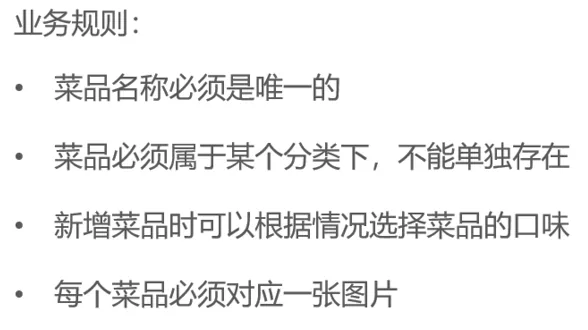
Requirements Analysis and Design
There will be a file upload thing
Code Implementation
File Upload
application.yml
yaml
spring:
  profiles:
active: devyaml
sky:
  alioss:
    endpoint: ${sky.alioss.endpoint}
    access-key-id: ${sky.alioss.access-key-id}
    access-key-secret: ${sky.alioss.access-key-secret}
bucket-name: ${sky.alioss.bucket-name}Basically these two snippets are all the configuration needed: the first one selects the dev profile and then dynamically configures the environment
application-dev.yml
Just configure it and you're good
yaml
sky:
  alioss:
    endpoint: oss-cn-beijing.aliyuncs.com
    bucket-name: chimingchangyin
    access-key-secret: *****
access-key-id: *****AliOssProperties
@ConfigurationProperties(prefix = "sky.alioss")
Automatically maps the configuration items with the specified prefix in the configuration file (application.yml) to the properties of the current class.
java
package com.sky.properties;

import lombok.Data;
import org.springframework.boot.context.properties.ConfigurationProperties;
import org.springframework.stereotype.Component;

@Component
@ConfigurationProperties(prefix = "sky.alioss")
@Data
public class AliOssProperties {

    private String endpoint;
    private String accessKeyId;
    private String accessKeySecret;
    private String bucketName;

}OssConfiguration
Here you need to note @Configuration, @Bean, and @ConditionalOnMissingBean
@Configuration marks the current class as a configuration class, equivalent to an XML file in traditional Spring, which is why the AliOssProperties configuration can be read here
@Bean indicates that the object returned by AliOssUtil is to be registered in the IoC container
@ConditionalOnMissingBean, used together with it, avoids duplicate registration
java
package com.sky.config;

import com.sky.properties.AliOssProperties;
import com.sky.utils.AliOssUtil;
import lombok.extern.slf4j.Slf4j;
import org.springframework.boot.autoconfigure.condition.ConditionalOnMissingBean;
import org.springframework.context.annotation.Bean;
import org.springframework.context.annotation.Configuration;

//配置类,用于创建AliOssUtil对象
@Configuration
@Slf4j
public class OssConfiguration {

    @Bean
    @ConditionalOnMissingBean
    public AliOssUtil aliOssUtil(AliOssProperties aliOssProperties) {
        log.info("开始创建阿里文件上传工具对象:{}", aliOssProperties);
        return new AliOssUtil(aliOssProperties.getEndpoint(),
                aliOssProperties.getAccessKeyId(),
                aliOssProperties.getAccessKeySecret(),
                aliOssProperties.getBucketName());
                //在这里传入配置当中的值进入工具类
                //因为工具类中是有@Data的
    }
}AliOssUtil
java
package com.sky.utils;

import com.aliyun.oss.ClientException;
import com.aliyun.oss.OSS;
import com.aliyun.oss.OSSClientBuilder;
import com.aliyun.oss.OSSException;
import lombok.AllArgsConstructor;
import lombok.Data;
import lombok.extern.slf4j.Slf4j;
import java.io.ByteArrayInputStream;

@Data
@AllArgsConstructor
@Slf4j
public class AliOssUtil {

    private String endpoint;
    private String accessKeyId;
    private String accessKeySecret;
    private String bucketName;

    /**
     * 文件上传
     *
     * @param bytes
     * @param objectName
     * @return
     */
    public String upload(byte[] bytes, String objectName) {

        // 创建OSSClient实例。
        OSS ossClient = new OSSClientBuilder().build(endpoint, accessKeyId, accessKeySecret);

        try {
            // 创建PutObject请求。
            ossClient.putObject(bucketName, objectName, new ByteArrayInputStream(bytes));
        } catch (OSSException oe) {
            System.out.println("Caught an OSSException, which means your request made it to OSS, "
                    + "but was rejected with an error response for some reason.");
            System.out.println("Error Message:" + oe.getErrorMessage());
            System.out.println("Error Code:" + oe.getErrorCode());
            System.out.println("Request ID:" + oe.getRequestId());
            System.out.println("Host ID:" + oe.getHostId());
        } catch (ClientException ce) {
            System.out.println("Caught an ClientException, which means the client encountered "
                    + "a serious internal problem while trying to communicate with OSS, "
                    + "such as not being able to access the network.");
            System.out.println("Error Message:" + ce.getMessage());
        } finally {
            if (ossClient != null) {
                ossClient.shutdown();
            }
        }

        //文件访问路径规则 https://BucketName.Endpoint/ObjectName
        StringBuilder stringBuilder = new StringBuilder("https://");
        stringBuilder
                .append(bucketName)
                .append(".")
                .append(endpoint)
                .append("/")
                .append(objectName);

        log.info("文件上传到:{}", stringBuilder.toString());

        return stringBuilder.toString();
    }
}Controller
CommonController
The file upload utility class is injected here
java
package com.sky.controller.admin;

import com.sky.constant.MessageConstant;
import com.sky.result.Result;
import com.sky.utils.AliOssUtil;
import lombok.extern.slf4j.Slf4j;
import org.springframework.beans.factory.annotation.Autowired;
import org.springframework.web.bind.annotation.PostMapping;
import org.springframework.web.bind.annotation.RequestMapping;
import org.springframework.web.bind.annotation.RestController;
import org.springframework.web.multipart.MultipartFile;

import java.io.IOException;
import java.util.UUID;

@RestController
@RequestMapping("admin/common")
@Slf4j
public class CommonController {
    @Autowired
    private AliOssUtil aliOssUtil;

    @PostMapping("/upload")
    public Result<String> upload(MultipartFile file){
        log.info("文件上传:{}",file);
        try {
            //原始文件名
            String originalFilename = file.getOriginalFilename();
            //截取原始文件名的后缀
            String extension = originalFilename.substring(originalFilename.lastIndexOf("."));
            String objectName = UUID.randomUUID().toString() + extension;
            String filePath = aliOssUtil.upload(file.getBytes(), objectName);
            return Result.success(filePath);
        } catch (IOException e) {
            log.error("文件上传失败:{}",e);
        }
        return Result.error(MessageConstant.UPLOAD_FAILED);
    }
}DishController
java
package com.sky.controller.admin;

import com.sky.dto.DishDTO;
import com.sky.result.Result;
import com.sky.service.DishService;
import lombok.extern.slf4j.Slf4j;
import org.springframework.beans.factory.annotation.Autowired;
import org.springframework.web.bind.annotation.PostMapping;
import org.springframework.web.bind.annotation.RequestBody;
import org.springframework.web.bind.annotation.RequestMapping;
import org.springframework.web.bind.annotation.RestController;

@Slf4j
@RestController
@RequestMapping("/admin/dish")
public class DishController {
    @Autowired
    private DishService dishService;

    @PostMapping
    public Result save(@RequestBody DishDTO dishDTO) {
        log.info("新增菜品:{}", dishDTO);
        dishService.saveWithFlavor(dishDTO);
        return Result.success();
    }
}Service
java
package com.sky.service;

import com.sky.dto.DishDTO;

public interface DishService {
    void saveWithFlavor(DishDTO dishDTO);
}java
package com.sky.service.impl;

import com.sky.dto.DishDTO;
import com.sky.entity.Dish;
import com.sky.entity.DishFlavor;
import com.sky.mapper.DishFlavorMapper;
import com.sky.mapper.DishMapper;
import com.sky.service.DishService;
import lombok.extern.slf4j.Slf4j;
import org.springframework.beans.BeanUtils;
import org.springframework.beans.factory.annotation.Autowired;
import org.springframework.stereotype.Service;
import org.springframework.transaction.annotation.Transactional;

import java.util.List;

@Service
@Slf4j
public class DishServiceImpl implements DishService {
    @Autowired
    private DishMapper dishMapper;
    @Autowired
    private DishFlavorMapper dishFlavorMapper;

    @Override
    @Transactional(rollbackFor = Exception.class)
    public void saveWithFlavor(DishDTO dishDTO) {
        Dish dish = new Dish();
        BeanUtils.copyProperties(dishDTO, dish);
        //向菜品表插入1条数据
        dishMapper.insert(dish);
        Long dishId = dish.getId();
        //向口味表插入n条数据
        List<DishFlavor> flavors = dishDTO.getFlavors();
        if (flavors != null && flavors.size() > 0) {
            flavors.forEach(flavor -> {
                flavor.setDishId(dishId);
            });
            dishFlavorMapper.insertBatch(flavors);
        }
    }
}Here, because the data has to be inserted into two tables, transaction management has to be enabled with @Transactional(rollbackFor = Exception.class)
Then object property copying is used to convert the DTO object into an Entity object, and the insert is executed on the dish table. Then comes the important part: since logical foreign keys are used here, we need to echo the data at the same time as the insert, so there will be a small exam point in the mapper XML file—I'll leave that for now
Then, after the insert succeeds, the id is obtained and echoed so that it can become the logical foreign key of the flavors
Next, a variable receives the single-column collection of flavors from the DTO, and if it is not empty, it is iterated over to assign the logical foreign key
After the iteration, the Mapper interface is called to perform a batch insert with dynamic SQL
Mapper
DishMapper
Because it is an insert operation, automatic filling of common fields has to be used
java
package com.sky.mapper;

import com.sky.annotation.AutoFill;
import com.sky.entity.Dish;
import com.sky.enumeration.OperationType;
import org.apache.ibatis.annotations.Mapper;
import org.apache.ibatis.annotations.Select;

@Mapper
public interface DishMapper {

    /**
     * 根据分类id查询菜品数量
     * @param categoryId
     * @return
     */
    @Select("select count(id) from dish where category_id = #{categoryId}")
    Integer countByCategoryId(Long categoryId);

    @AutoFill(value = OperationType.INSERT)
    void insert(Dish dish);
}DishMapper.xml
What is needed here are useGeneratedKeys and keyProperty
useGeneratedKeys="true" enables the primary key echo feature
keyProperty="id" specifies that the primary key value is to be echoed onto the id property
Note that this is not an arbitrary assignment; it has to have a binding relationship with the Java object property
xml
<?xml version="1.0" encoding="UTF-8" ?>
<!DOCTYPE mapper PUBLIC "-//mybatis.org//DTD Mapper 3.0//EN"
        "http://mybatis.org/dtd/mybatis-3-mapper.dtd" >
<mapper namespace="com.sky.mapper.DishMapper">

    <insert id="insert" useGeneratedKeys="true" keyProperty="id">
        insert into dish (name,
                          category_id,
                          price,
                          image,
                          description,
                          create_time,
                          update_time,
                          create_user,
                          update_user,
                          status)
        values (#{name},
                #{categoryId},
                #{price},
                #{image},
                #{description},
                #{createTime},
                #{updateTime},
                #{createUser},
                #{updateUser},
                #{status})
    </insert>
</mapper>DishFlavorMapper
java
package com.sky.mapper;

import com.sky.entity.DishFlavor;
import org.apache.ibatis.annotations.Mapper;

import java.util.List;

@Mapper
public interface DishFlavorMapper {

    void insertBatch(List<DishFlavor> flavors);
}DishFlavorMapper.xml
There's nothing much to say here, it's just dynamic SQL
xml
<?xml version="1.0" encoding="UTF-8" ?>
<!DOCTYPE mapper PUBLIC "-//mybatis.org//DTD Mapper 3.0//EN"
        "http://mybatis.org/dtd/mybatis-3-mapper.dtd" >
<mapper namespace="com.sky.mapper.DishFlavorMapper">
    <insert id="insertBatch">
        insert into dish_flavor (dish_id,name,value) values
        <foreach collection="flavors" item="df" separator=",">
            (#{df.dishId},#{df.name},#{df.value})
        </foreach>
    </insert>
</mapper>Conclusion
At the end I was a bit tired, so my learning efficiency was rather low. In the end I went back to the dorm and lay down for a while, then came back in the evening to write the summary of the second topic, adding a dish. When I was sleepy I had no idea what I was doing, and I wasted a little bit of time
03-Paginated Query for Dishes
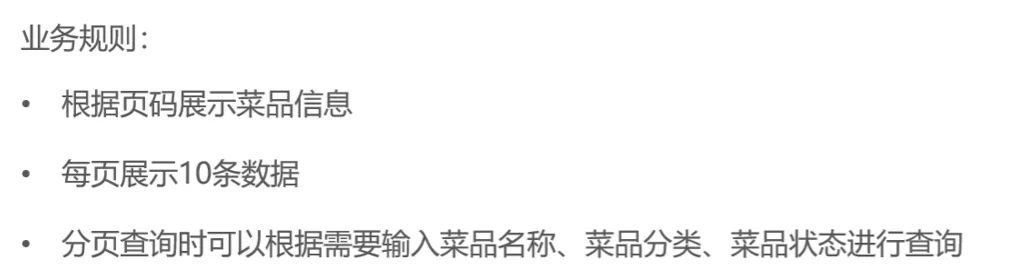
Requirements Analysis and Design
Code Implementation
Controller
Same as always, a paginated query is a get request, so the generic return type PageResult is used
java
@GetMapping("/page")
public Result<PageResult> page(DishPageQueryDTO dishPageQueryDTO) {
    log.info("菜品分页查询");
    PageResult pageResult = dishService.page(dishPageQueryDTO);
    return Result.success(pageResult);
}Service
java
PageResult page(DishPageQueryDTO dishPageQueryDTO);java
@Override
public PageResult page(DishPageQueryDTO dishPageQueryDTO) {
    PageHelper.startPage(dishPageQueryDTO.getPage(),dishPageQueryDTO.getPageSize());
    Page<DishVO> page = dishMapper.pageQuery(dishPageQueryDTO);
    return new PageResult(page.getTotal(),page.getResult());
}Still using PageHelper for the paginated query
Here we finally get to use a VO view object, which is the object used to display data to the frontend
Mapper
java
Page<DishVO> pageQuery(DishPageQueryDTO dishPageQueryDTO);java
<select id="pageQuery" resultType="com.sky.vo.DishVO">
    select d.* , c.name as categoryName from dish d left outer join category c on d.category_id = c.id
    <where>
        <if test="name != null">
            and d.name like concat('%',#{name},'%')
        </if>
        <if test="categoryId != null">
            and d.category_id like concat('%',#{categoryId},'%')
        </if>
        <if test="status != null">
            and d.status like concat('%',#{status},'%')
        </if>
    </where>
    order by d.create_time desc
</select>An alias is used for naming, and the rest is the usual fuzzy search
Summary
Nothing new, it's all review of old material, but that is actually pretty good for reinforcing my memory
04-Deleting Dishes
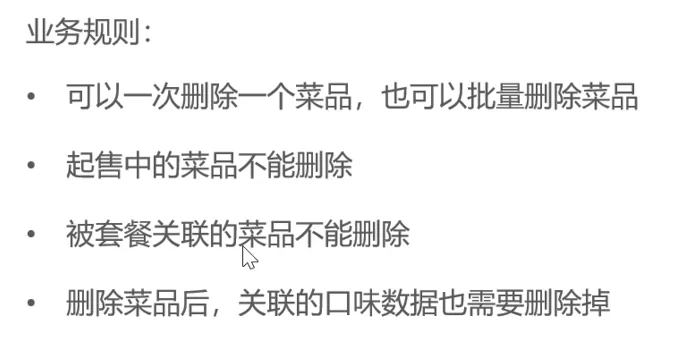
Requirements Analysis and Design
Code Implementation
Controller
@RequestParam is used to read the request parameters from the URL
java
@DeleteMapping
public Result delete(@RequestParam List<Long> ids) {
    log.info("菜品批量删除:{}",ids);
    dishService.delete(ids);
    return Result.success();
}Service
java
void delete(List<Long> ids);java
@Override
public void delete(List<Long> ids) {
    //判断当前菜品是否能够删除--是否存在起售中的菜品
    for (Long id : ids) {
        Dish dish = dishMapper.getById(id);
        if(dish.getStatus() == StatusConstant.ENABLE){
            //商品属于起售中,不能删除
            throw new DeletionNotAllowedException(MessageConstant.DISH_ON_SALE);
        }
    }
    //判断当前菜品是否能够删除--是否被套餐关联了
    List<Long> setMealIds = setMealDishMapper.getSetMealDishIdByDishId(ids);
    if(setMealIds != null && setMealIds.size() > 0){
        throw new DeletionNotAllowedException(MessageConstant.DISH_BE_RELATED_BY_SETMEAL);
    }
    //删除菜品表中的菜品数据
    //ids.forEach(id -> {
    //    dishMapper.deleteById(id);
    //    dishFlavorMapper.deleteByDishId(id);
    //});
    dishMapper.deleteByIds(ids);
    dishFlavorMapper.deleteByDishIds(ids);
}First iterate to check whether the dishes can be deleted, then delete the dishes
Mapper
java
List<Long> getSetMealDishIdByDishId(List<Long> dishIds);xml
<select id="getSetMealDishIdByDishId" resultType="java.lang.Long">
    select setmeal_id from setmeal_dish where dish_id in
    <foreach collection="dishIds" item="dishId" separator="," open="(" close=')'>
        #{dishId}
    </foreach>
</select>java
void deleteByDishIds(List<Long> ids);xml
<delete id="deleteByDishIds">
    delete from dish_flavor where dish_id in
    <foreach collection="ids" open="(" close=")" separator="," item="id">
        #{id}
    </foreach>
</delete>05-Updating a Dish
Requirements Design and Analysis
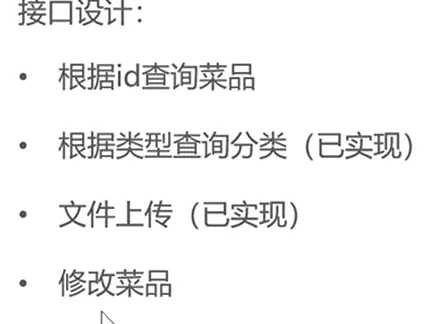
Code Implementation
Controller
java
@GetMapping("/{id}")
public Result<DishVO> getById(@PathVariable Long id) {
    log.info("根据id查询菜品:{}",id);
    DishVO dishVO = dishService.getByIdWithFlavor(id);
    return Result.success(dishVO);
}
@PutMapping
public Result update(@RequestBody DishDTO dishDTO) {
    log.info("修改菜品:{}",dishDTO);
    dishService.updateWithFLavor(dishDTO);
    return Result.success();
}Service
java
DishVO getByIdWithFlavor(Long id);
void updateWithFLavor(DishDTO dishDTO);java
@Override
public DishVO getByIdWithFlavor(Long id) {
    //根据id查询菜品数据
    Dish dish = dishMapper.getById(id);
    //根据菜品id查询口味数据
    List<DishFlavor> dishFlavors = dishFlavorMapper.ge
    //将查询到的数据封装的到VO
    DishVO dishVO = new DishVO();
    BeanUtils.copyProperties(dish, dishVO);
    dishVO.setFlavors(dishFlavors);
    return dishVO;
}
@Override
public void updateWithFLavor(DishDTO dishDTO) {
    Dish dish = new Dish();
    BeanUtils.copyProperties(dishDTO, dish);
    //修改菜品表基本信息
    dishMapper.update(dish);
    //删除原有的口味数据
    dishFlavorMapper.deleteByDishId(dish.getId());
    //重新插入口味数据
    List<DishFlavor> flavors = dishDTO.getFlavors();
    if (flavors != null && flavors.size() > 0) {
        flavors.forEach(flavor -> {
            flavor.setDishId(dishDTO.getId());
        });
        dishFlavorMapper.insertBatch(flavors);
    }
}Mapper
java
@Select("select * from dish_flavor where dish_id = #{id}")
List<DishFlavor> getByDishId(Long id);